 As a leading website host, GoDaddy lets you quickly create a professional-looking website. In this article, we will review some key GoDaddy Website Builder features when building your new website using one of their Website Builder Plans.
Also, while there are several GoDaddy hosting options and plans, many beginners will find the Website Builder Hosting Plans an excellent place to start.
GoDaddy Website Builder Plans

Note: Pricing listed above subject to change.
GoDaddy website builder offers free and paid hosting plans that provide different services depending on the needs of your website.
I’ll bet you didn’t know that GoDaddy offers a free web hosting plan. However, their free plan is limited, yet an excellent, no-cost way to try some of their site design tools or to build a basic website.
When you first sign up, you can a 7-day free trial access to all the premium features. If you like their site-building tools, consider subscribing to one of their paid Website Builder Plans.
They are very affordable and provide a range of options to meet many different needs:
- Basic Plan: Ideal for small businesses looking for essential features
- Premium Plan: Designed for companies in need of robust features
- Ecommerce Plan: Tailored for businesses selling products online
With the basic plan, you can connect a custom domain, use branded content creation and design tools, built-in SEO, and much more.
Upgrade to the premium plan and enjoy all the features of the Basic Plan, plus increased email capacity, a recurring appointment calendar, and email marketing tools. You can create and launch social media ads on multiple platforms and make online payments and deposits.
Lastly, the e-commerce plan includes all previous plan features plus the ability to set up an online shop, manage inventory, and access valuable analytics for insights into your business operations.
GoDaddy Website Builder Features Tools Perfect for Beginners
GoDaddy’s Website Builder is an excellent start for anyone building their first website.
Please read on to see why it’s an excellent choice for individuals and businesses needing to build a professional online presence that’s easy to manage.
Website Builder Features Provide Flexibility and Customization
 The GoDaddy Website Builder offers great flexibility and customization options.
Users can easily create unique sections per page, each with a variety of content types, such as photo galleries, videos, and blogs.
Adding new sections is a breeze with the website builders’ user-friendly interface. Just click “+” on the page your designing to add a new section, then choose from the list of available sections, the one that suits your content best. Maybe you need to add a slider for rotating images or a custom form to collect user data.
GoDaddy’s Website Builder also provides many extra features and add-ons to customize your site. You can even add contact forms, password protection, and popup messages.
For those just starting out, GoDaddy’s Website Builder is the perfect choice for beginners to create a new website quickly.
GoDaddy’s Website Builder Features Easy-To-Use Page Builder Templates
 Using web design software makes it easy to create a stunning website quickly. GoDaddy’s Website Builder features tools that provide many user-friendly templates that simplify the website design process.
First, choose a template that best reflects your site’s purpose. GoDaddy’s wide selection of themed templates means you’ll find the perfect fit for your personal or business brand.
Website Builder Page Design Features
 Building a website may seem intimidating for some, but with the “Add Section” page builder feature, creating content becomes more enjoyable and less hassle-free.
Instead of manually coding each page, you click a “+” symbol on the page, select the section type, and then choose one of the available sections to add directly to the page design area—sections such as Image Gallery, Audio & Video, Blog Newsletter to name a few.
This “Add Section” page creation process allows you to build pages quickly. You can also customize font sizes, website colors and apply effects like shadows or gradients to create a visually appealing design.
Each section allows you to change the layout or move them up or down on the page. These controls make adding or updating content on your website quick and easy.
Adding Pages to Your Sites Navigation Menu
 Maintaining an organized and tidy navigation menu is easy. To add a new page, click the ‘+’ icon next to Site Navigation and follow the prompted instructions.
Also, pages you have removed from your website can also be deleted. A simple, well-structured navigation menu will make it easy for visitors to find your site pages and blog posts.
Time To Design Your Page Content
 Now that you have established your site structure, it’s time to populate each new page with compelling content.
Using the drag-and-drop features we mentioned, you can begin creating your page content using text blocks, images, videos, or any other elements you want included.
The GoDaddy Website Builder features page builder elements to help you create consistency across all pages, including spacing, font size, style, and color. Also, spice it up by incorporating parallax effects or animations for added visuals on specific pages.
When writing the content for your pages, include relevant keywords and phrases that visitors might search for to improve your on-page SEO.
Structuring Your Website for Visitors
 As we mentioned, once you have finished creating content for your website, it’s important to structure it logically.
As with the navigation menu where you create links to your website pages, you also want to create internal links between these pages that support a similar topic. This internal linking is referred to as “Clustering,” which helps search engines like Google determine what your site’s content is primarily about.
Creating internal links enhances the user experience and is an SEO best practice to help improve search engine optimization.
Creating these internal links between pages also helps visitors find additional information on a topic. This practice helps promote all the related information you offer on any topic, making it easy for visitors to navigate your website and find what they want.
Publishing Your Website on GoDaddy
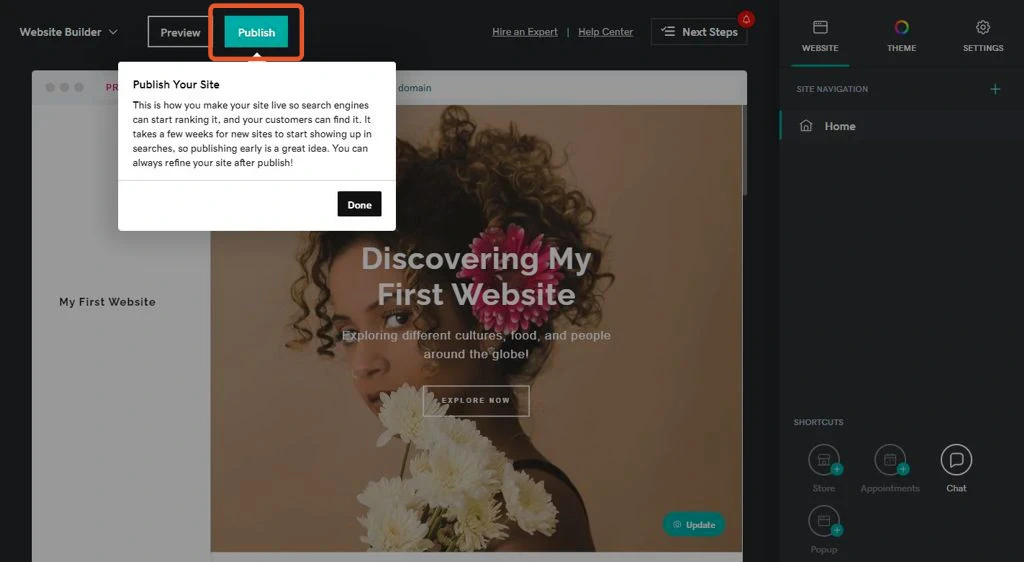 Congratulations! You’ve done it. After extensive research, design, proofing, and testing, your website is ready to “Go Live”!
Just a final once-over before hitting that “Publish” button is crucial. Here’s a checklist to ensure everything is up to scratch:
- Visually Appealing Design: Take a top-to-bottom look at each page. Are the images loading correctly? Do the colors complement each other? Is the logical flow between pages maintained? Don’t forget to optimize for mobile devices!
- Compelling Content: Double-check if your content is well-written, free of spelling or grammatical errors, and correctly attributed. Include relevant keywords to help boost search engine optimization (SEO) and improve visibility.
- Seamless Functionality: Verify that all links lead to the intended destinations. Fix any broken links or missing images. Test interactive features like contact forms to ensure they work correctly. A flawless user experience is essential!
Remember, an attractive design, compelling content, and flawless functionality are crucial for a successful website launch.
Polish everything up and hit that “Publish” button with confidence!
Take Your New Website Beyond the Basics.
A website’s quality is based on the value it offers to visitors. Here are some additional tips to enhance your website and take it to the next level.
You can improve the visitor experience, readability, and the message of your site’s content. Do your pages answer the questions your visitors might be asking? These questions are the search terms and phrases someone might enter in a search engine like Google.
This search intent is what brought the visitor to your page or post. Be sure that your page content thoroughly answers the visitors’ questions so they don’t leave and look elsewhere.
Get Visitor Attention with Popup Messages
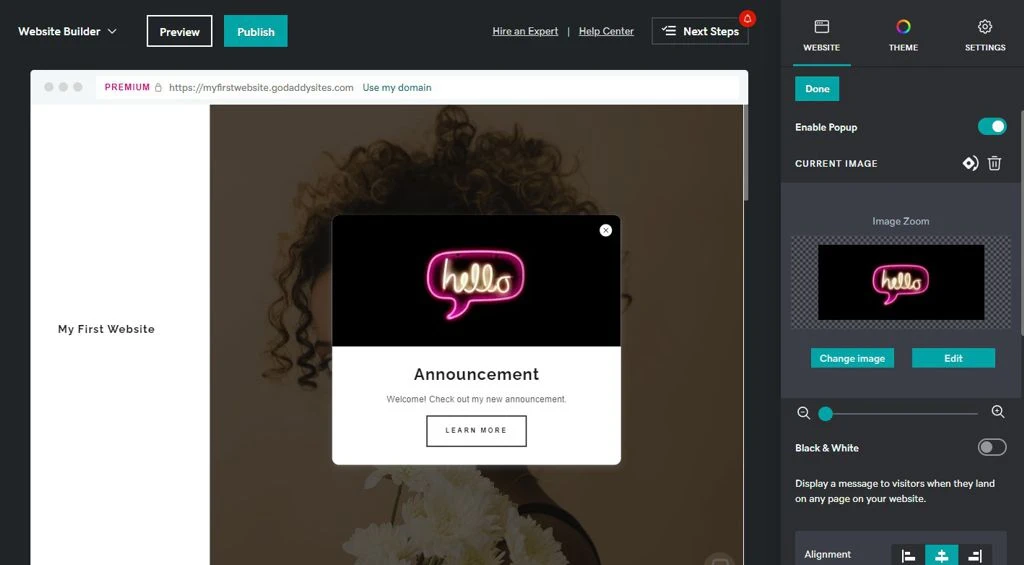 With GoDaddy Website builder, you can easily create engaging popup messages for visitors when they land on a page.
These “Call to Action” messages help you promote anything of interest to visitors, such as customer offers, new content, or exclusive discounts.
They usually guarantee that all visitors will see the message you share in the popup. However, a word of caution about having too many popups: visitors may find this “spammy” and leave your website.
Popups are not enabled by default. You must first enable them from the “Shortcuts” options at the bottom of the “Website” tab.
Add an Online Calendar for Scheduling Appointments
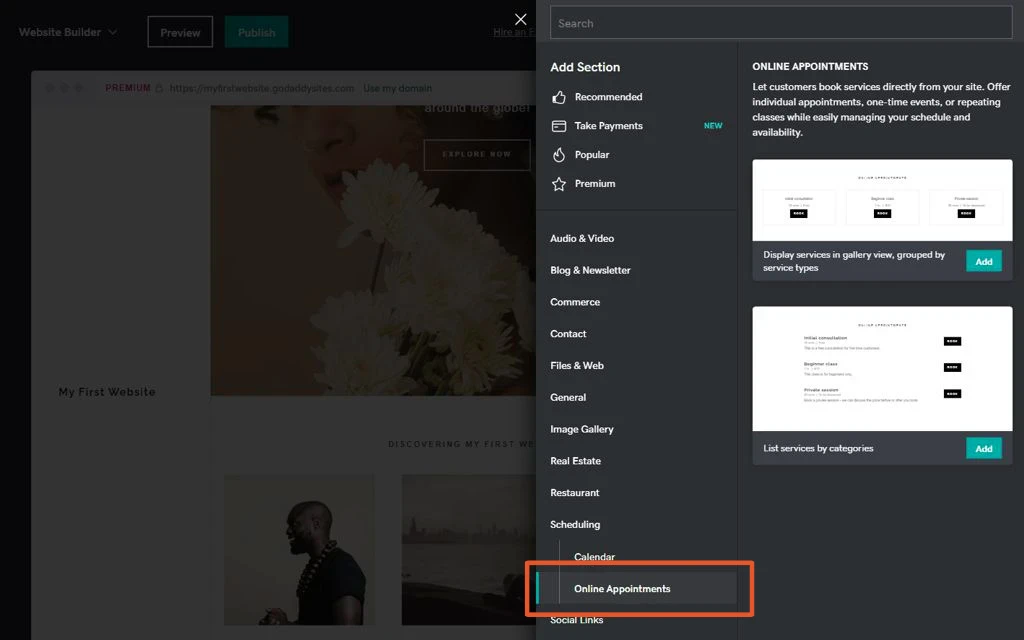 One of the GoDaddy Website Builder features is setting up online appointment bookings.
Fill out the required fields from the user-friendly website builder dashboard and let them handle the rest.
These integrated features help simplify your appointment management processes.
Add Your Social Media Links
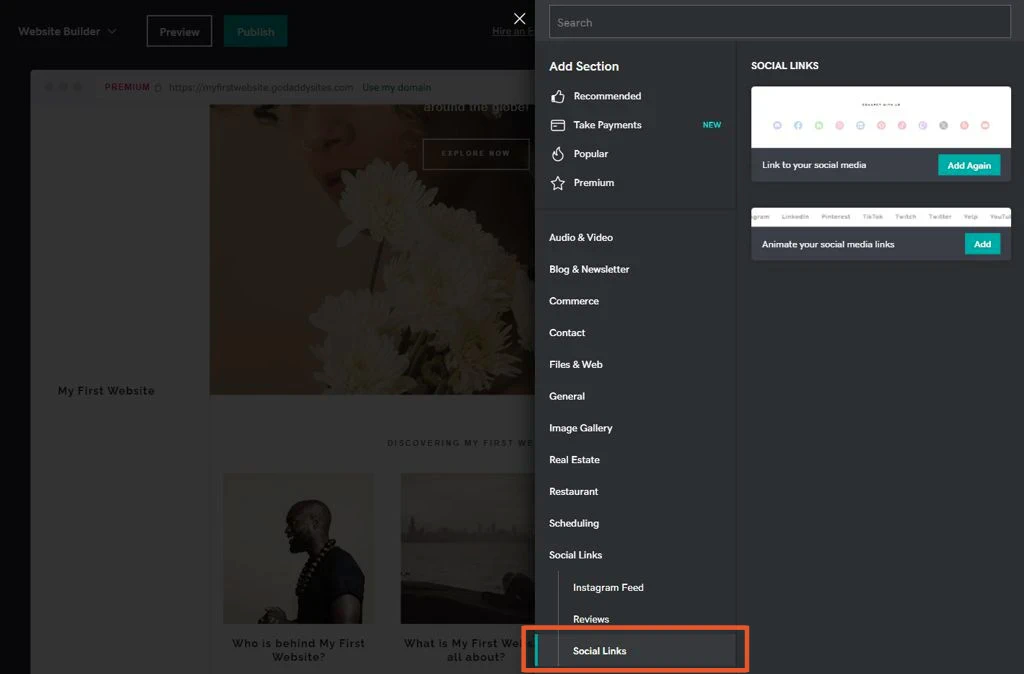 Having social media accounts is fundamental for a personal or business website.
With GoDaddy Website Builder features, you can easily add social media buttons to your website.
By linking between your social media accounts, you increase your online presence to draw more visitors to your website.
Don’t Overlook Website Builders General Settings
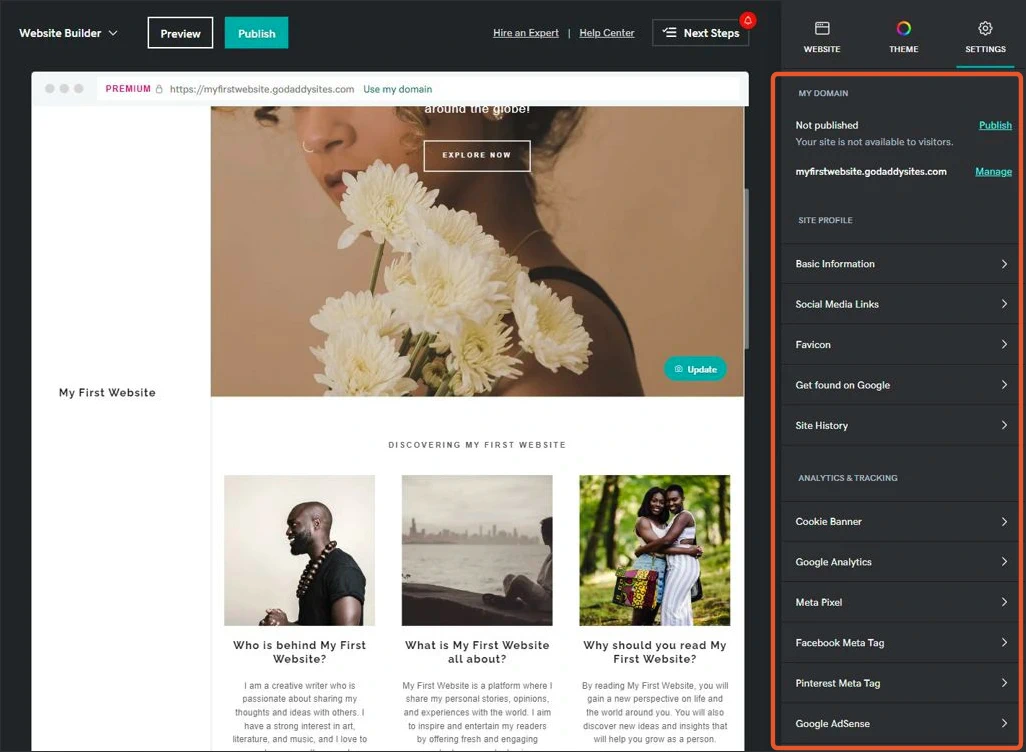 The Website Builder “Settings” tab allows you to easily customize your website, giving it a professional and modern look.
As we discussed, you can personalize details such as your business category, address, email information, and links to your social media profiles.
Additionally, optimizing your website is essential to improve your chances for search engine visibility.
Therefore, using keywords in your page headings and content, as well as the titles and descriptions for each page, will improve the chance visitors will find your website pages when searching for these relevant terms.
Blog About Topics Visitors Would Find Interesting
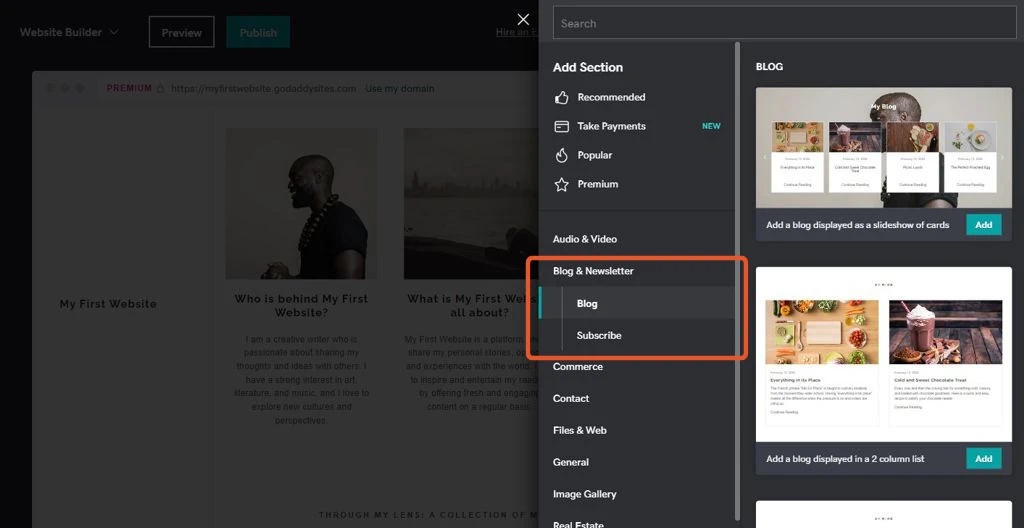 GoDaddy simplifies sharing stories and updates with others through its user-friendly blogging features. Visitors can easily manage comments on posts via the dashboard.
Blogging is an ideal way for businesses to keep customers updated about new products or services and for individuals to share their interests and experiences.
Plus, visitor comments are an excellent opportunity for companies and individuals to gather valuable feedback on the blog post.
Final Thoughts
Is it hard building a website on GoDaddy? In my experience, absolutely not, as their hosting options are a great place to start for your new website. Their Website Builder features provide an easy and affordable way to create your own website. Plus, beginners can quickly start with on-page section-building tools, mobile-friendly templates, marketing tools, hosting packages, video tutorials, and guides.
If you’re looking for a user-friendly way to build a website, GoDaddy has many options to fit everyone’s needs. Therefore, whether you’re a beginner or an experienced website designer, GoDaddy is an excellent choice for anyone needing to host a website.
We like the free trial, so you can see how the site builder tools work and decide if it’s right for you.
If you want more information on building your site and other hosting plans from GoDaddy, you can read more about what GoDaddy Web Hosting offers.