 Whether you’re launching a business, building a personal brand, or starting a passion project, a website is essential for reaching your audience and sharing your message. Here’s a step-by-step guide to setting up a website from scratch.
Define Your Goals
Before you start, it is important to define what you want your website to achieve. Do you need web hosting for a small business that sells products or services? Is it a portfolio showcasing your work? Who is the target audience? Or a blog sharing your ideas?
Knowing your goals will guide the rest of the website planning process.
Specific Goals in Planning a Website
Depending on the nature of your website, the goals can be quite different. Here are a few specific ideas:
- E-Commerce Store: If you’re selling products, your goal might be to increase conversions and average order value.
- Personal Portfolio: A portfolio website could aim to attract potential employers or clients by strikingly showcasing your work.
- Blog: If it’s a blog, the goal might be to build a loyal readership and engage them with regular, high-quality content.
- Non-Profit Organization: The key goals of non-profit organizations could be to raise awareness about a cause, promote events, and drive donations.
- Educational Website: The primary goal of an educational website could be to provide informative and engaging content that helps visitors learn a new skill or concept.
Remember, your website goals should align with your overall business or personal objectives. Are you expanding your online marketing or looking to generate leads to sell your products or services?
You want your website’s structure to best represent your personal or business brand. In website planning, you wouldn’t choose an E-Commerce solution if you don’t plan to sell products on your website.
Choose Your Domain Name
 Your domain name is your online address (like www.yourname.com). It should be easy to spell, memorable, and reflect your brand or business objectives. Register a domain with web hosting services like GoDaddy, HostGator, or Bluehost.
Considerations When Choosing a Domain Name
Choosing the right domain name requires careful thought and consideration. Here are some key factors to take into account:
- Branding: Choose a domain name that reflects your brand and target audience. Make sure it is unique and distinctive. Avoid using hyphens and numbers, which can complicate and detract from your brand.
- Simplicity: Domain names should be easy to type and remember. This will help increase brand awareness for your new domain. Using complex spellings and long strings of words can be confusing and complicated for visitors to recall. One exception may be “Llanfairpwllgwyngyllgogerychwyrndrobwllllantysiliogogogoch.co.uk“. While it’s unlikely anyone could or should remember this domain, it did have the distinction of being awarded the longest domain name by the Guinness Book of World Records.
- Extension: Aim for a ‘.com’ domain extension if possible, as it’s the most recognized and trusted. However, extensions like ‘.net’, ‘.org’, or ‘.io’ could also work, especially if they fit your brand or business better. There are many very specific extensions that you might consider if they fit well with your business and a good .com is unavailable. For example, a solar company might consider a .solar or a beauty salon might consider .salon as an alternate domain extension.
- Legalities: Ensure your chosen domain name isn’t copyrighted or trademarked by another company. This could result in legal issues down the line. A quick search online at the “United States Patent and Trademark Office” can help you confirm this. And just so you know, trying to hyphenate a trademarked brand will likely not avoid a potential violation. (i.e., micro-soft.com) would not be a good idea. Of course, I am not offering any legal advice in this area. If you’re unsure, always consult a legal expert.
- SEO-friendly: Including keywords related to your brand or industry can benefit SEO (Search Engine Optimization), helping your website rank higher in search results. Of course, if possible, you’ll want it to reflect your company name and products and services. As we mentioned before, one of the many new domain extensions, such as .solar or .salon, can often help you do this.
Remember, your domain name is an integral part of your online identity. Like most businesses or individuals, it’s important to take your time to choose wisely before you begin your website development.
Select a Hosting Provider
 A web host provides the online space where your website lives. Many types of web hosting options are available, from shared hosting (cheaper but slower and less reliable) to dedicated hosting (more expensive but faster and more reliable).
Some recommended hosting providers include Bluehost, SiteGround, and DreamHost. All of which offer hosting plans for all website development needs.
Choosing the Right Hosting Plan
When choosing a web hosting plan for your website, it’s important to consider several factors:
- Performance: Look for a hosting plan that offers strong performance and speed. Slow web page loading times can lead to high bounce rates and poor experience for website visitors. If you start your website development on a lower entry-level plan, ensure you can easily upgrade with little to no downtime.
- Reliability: Select a hosting provider known for its reliability and uptime. You want all the pages of your website to be accessible at all times.
- Customer Support: Choose a hosting provider that offers excellent customer service. You’ll want quick and efficient help resolving any pain points you may encounter during and after creating a website.
- Scalability: Choose a hosting plan that can scale with your website as it grows. Successful websites need the ability to upgrade easily and hassle-free.
- Security Features: Prioritize a hosting provider that offers robust security features. These include SSL certificates, firewalls, and regular backups. Security should also be part of your website development plan and should include add-ons or plugins that enhance security and traffic reporting and alerts for all web pages.
- Price: Evaluate the pricing plans of your prospective hosting providers. Remember that the cheapest option isn’t always the best. Consider the value for money and what the plan includes. The complexity of your website design, from the pages to the use of images, will contribute to the hosting plan needed to give you the best Bang-for-the-Buck price-performance ratio.
Making the right hosting choice is crucial for the success of your website. Therefore, take your time and choose a host that meets your specific needs.
Choose a Platform to Build Your Website
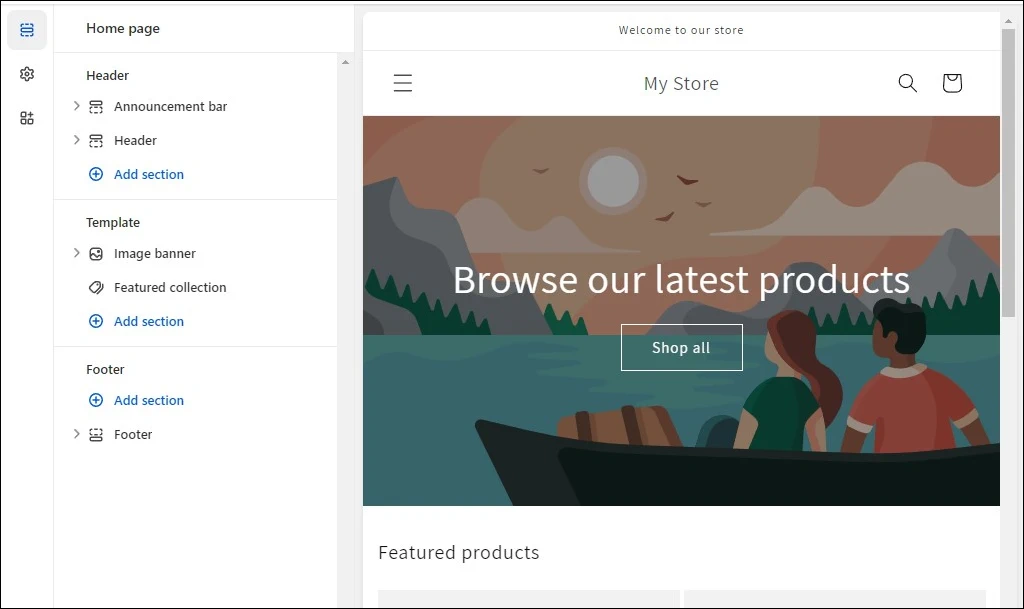 Many platforms can help you build your website without knowing how to code. WordPress (CMS) is the most popular, offering flexibility and a large community of users. It is so popular that many web hosting providers offer “Managed WordPress Hosting” services strictly for websites built using the WordPress CMS platform. While WordPress is the Defacto standard for site builders, it also requires some experience or willingness to learn should you choose this option to create a website. If you have the time, it’s worth learning.
I have been developing WordPress sites for over 20 years, and this Content Management System (CMS) is very easy to learn. Several years ago, they added a built-in page builder called Gutenberg. Yeah, I know Johannes Gutenberg brought letterpress printing to Europe, but it’s a silly name for this very user-friendly page builder.
Of course, there are other options many may find easier to use, such as the dedicated site builder tools provided by Wix, Squarespace, and Shopify (the image above), to name a few.
Choosing the Best Web Hosting Platform for Your Website
When choosing a web hosting platform for your website project, it is important to consider the following in your website planning process:
- Ease of Use: The website builder on your hosting platform should have an intuitive interface that makes it easy to create and manage your website, even if you have no coding skills. This is important should you need to hand off website development to a third party.
- Customization Options: The hosting platform’s website-building tools should offer a wide range of themes and plugins that allow you to customize the appearance and functionality of your website design to suit your needs.
- SEO Capabilities: The platform should have robust SEO features or support trusted third-party tools to ensure your website ranks well in search engine results.
- Customer Support: Consider the quality of the platform’s customer service. The provider should offer quick and efficient support if you encounter any problems.
- Pricing: Evaluate the cost of using the platform. Consider the initial cost and any ongoing costs for hosting, updates, and additional features.
- Scalability: You should be able to easily update and expand your website as your business grows. Therefore, choose a platform that provides scalability and portability (i.e., the ability to move it to another web hosting platform or provider).
- Security: Look for a platform with robust security features to protect your website from cyber threats.
Choosing the right web hosting platform is crucial for the success of your website. Take your time and choose a platform that meets your specific needs and aligns with your business goals.
Design Your Website for a Target Audience
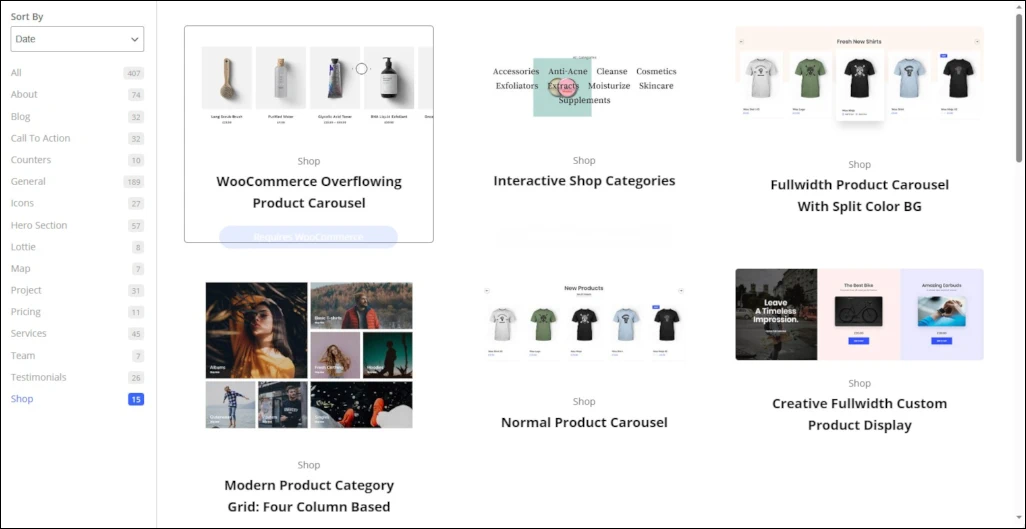 Designing your website involves choosing a theme or template, creating pages (like Home, About, Contact), and adding content (text, images, videos).
Make sure your design aligns with your goals and speaks to your target audience. Keep your website design clean, easy to navigate, and mobile-friendly.
Items to Consider in the Design of Your Website
When designing your website, consider the following key aspects in website planning:
- User Experience (UX): Ensure your site is intuitive and easy to navigate. The content should be organized logically, guiding users through your site effortlessly.
- Visual Design: Choose a consistent color scheme, font style, and images that align with your brand identity. Start by understanding the “60-30-10 Color Rule“. Plus, always prioritize readability and clarity when creating pages that customers will love.
- Content Quality: Create high-quality, in-depth original content that offers value to your customers. Make sure it’s free of spelling and grammar mistakes.
- Mobile Responsiveness: Ensure your website works well on all devices, including mobile phones and tablets. This is crucial to ensure all visual elements display correctly since a significant portion of web traffic comes from mobile devices. One way to quickly test this is by opening your website in Google Chrome and hitting the “F12” key to open developer mode.
- Loading Speed: Optimize your website pages to load quickly. Slow loading times can lead to high bounce rates. The most common reason for slow loading times is often improperly formatted images. This is especially important for your website’s Home Page.
- SEO: Use SEO-friendly URLs, meta tags, and page content to improve your website’s visibility in search engine results. This is an important consideration in the website planning process.
- Accessibility: Your website should be accessible to all users, including those with disabilities. This includes providing alt text for images and ensuring your site is navigable with a keyboard. Several platforms, such as WordPress, support plug-ins to help configure these options.
- Call to Action (CTA): Guide your visitors towards a specific action, whether it’s for customers to make a purchase, sign up for a newsletter, or get in touch with you.
- Analytics: Implement tracking tools like Google Analytics to monitor your website’s performance and visitor behavior. This helps you track visitor trends in a few different ways. Visitor analytics enables you to organize information on your website to better target market trends.
- Legal Requirements: Ensure your website meets all legal requirements, such as having a privacy policy if you collect personal data from your visitors. This is specifically required to meet privacy laws in the US State, like California, and the whole of the EU if you allow your website to be accessed there.
Search Engine Optimization (SEO)
 Search engine optimization (SEO) is just one of many ways to promote a new website so it will rank higher in search results, bringing more traffic to your site. Some SEO best practices include:
General SEO Considerations
- Use relevant keywords in your content and heading tags (h1-h6).
- Create high-quality, original content.
- Make sure your website loads quickly.
- Include internal and external links in your content.
- Ensure your website is secure (HTTPS).
Google-Specific SEO Items to Consider
When optimizing for Google SEO, it’s essential to consider the following considerations:
- Google Algorithm Updates: Stay current with Google’s algorithm updates to ensure your SEO strategies are effective.
- Mobile-First Indexing: Google now views websites from the perspective of a mobile device first, so ensure your site is mobile-friendly.
- Site Structure: A well-organized site structure helps Google to understand and index your content more effectively. This is often referred to as “Topic Silos,” where pages/posts interlink internally, creating a silo of information on each specific topic.
- E-E-A-T Principle: Google values Experience, Expertise, Authoritativeness, and Trustworthiness (E-E-A-T). Make sure your content reflects these qualities to stay ahead of your competitor’s websites.
- Semantic Search: Google tries to understand the context and intent behind a query. Thus, focusing new and existing material on topics, not just keywords, can improve your SEO.
- Core Web Vitals: Google uses Core Web Vitals to measure user experience on your website. These include loading time, interactivity, and visual stability.
- Google My Business: If applicable, use Google My Business to increase your visibility in local search results.
- Structured Data: Use schema markup in your content creation process to provide Google with additional information about your content pages, enhancing your visibility in search results.
Launch Your Website
 Once you’re happy with your website, it’s time to publish it. Depending on the website-building platform you’re using, this involves clicking the “Publish” or “Go Live” button.
Once live, share your website with friends and family and on social media as the first step in promoting it.
Items to double-check before launching your new website
There are several specific steps you need to consider when launching a new website:
- Final Checks: Ensure your site is fully functional across different devices and browsers before launching. Test all links, forms, and scripts to ensure they work as expected. A free helpful tool to check these is “Screaming Frog SEO Spider“.
- SEO Setup: Make sure your SEO details, such as meta titles, descriptions, and keywords, are correctly added to your pages. Also, generate and submit your sitemap to search engines.
- Favicon: Add a favicon – a small icon that appears in the browser tab when someone visits your site. It helps to identify your site and reinforces branding.
- Google Analytics: Add a Google Analytics tracking code on your website to track visitor behavior and gather valuable data to keep ahead of competitors’ websites.
- Backup and Security Measures: Implement a regular backup schedule and ensure security measures like SSL are in place to protect your site.
- Terms & Conditions and Privacy Policy: Ensure your website has these legal pages to build trust with your users and comply with regulations.
- Contact Information: Make sure your contact information is easily accessible so visitors can get in touch if needed. This is assumed for any small businesses but is also a “Trust” component of Google’s E-E-A-T Principal.
- Social Media Integration: Link your website to your social media platforms to increase exposure and facilitate user sharing of content.
Monitor and Update Your Website
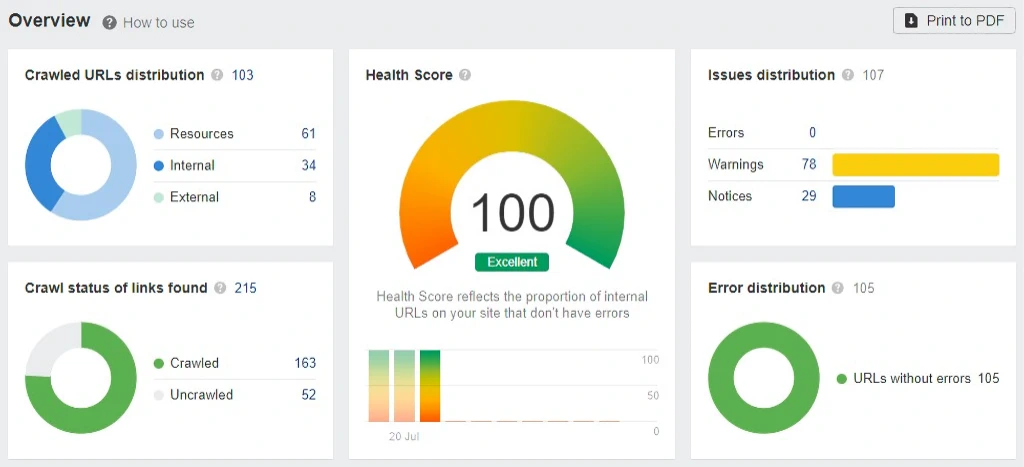 After launching, monitor your website’s performance using tools like Google Analytics. Regularly update your content to keep it fresh and relevant.
Remember, building a website is a journey, not a destination.
Tools to Consider for Monitoring Website Performance
- Google Analytics: As mentioned in the “Launching Your Website” checklist, this tool provides comprehensive data about your website traffic, user behavior, and overall performance.
- Page Speed Insights: Google runs this tool to check the loading speed of your website and offers suggestions for improvement.
- Heatmap Tools: By using tools like Crazy Egg or Hotjar, you can understand how users interact with your website, where they click, and where they spend most of their time.
- SEO Audit Tools: These tools will help you evaluate your website’s SEO performance and identify issues such as broken links, missing meta descriptions, or low-quality content.
- Website Uptime Monitoring: Tools such as Pingdom or Uptime Robot will notify you when your website goes down, helping you keep it available for users.
- User Feedback: An invaluable performance monitoring tool, user feedback can guide you toward areas of improvement that analytics might not reveal.
Regularly reviewing and addressing the data these tools provide will help improve website performance, user experience, and overall success.
Importance of Keeping Website Content Updated and Fresh
- Improve SEO Ranking: Search engines favor websites that regularly update their content. This enhances the chances for higher keyword rankings and significantly improves overall visibility in search engine results.
- Attract and Retain Users: Your content plan should include keeping your content fresh and updated to keep users engaged and encourage return visits. This can lead to increased recognition, trust, and conversions.
- Stay Relevant: Regularly updated content ensures your information remains current and relevant. This is crucial for most businesses that revolve around time-sensitive information and ideas.
- Enhance User Experience: Quality, updated content improves user experience. It can improve navigation, provide valuable information, and increase the overall appeal of your website.
- Boost Authority & Credibility: A website with current, relevant content reflects professionalism and expertise. This can boost your credibility and establish your site as an authoritative source in your industry.
- Social Media Promotion: Fresh content provides continuous material for social media promotion. It can generate more likes, shares, and comments, increasing exposure and traffic.
- Encourage Backlinking: Updated, valuable content is more likely to be shared or linked by other reputable websites. These backlinks can significantly boost your SEO performance.
Keeping website content updated and fresh is critical to realizing successful websites.
Website planning will give you a head start in generating content ideas that not only answer the key questions visitors are searching for but also help you create a website design that visitors will return to again and again.
Final Thoughts
There is nothing more to say than to consider that your website is an investment in your brand or project’s future. Take your time, do your research, and create content that converts readers. Build something beautiful that truly represents you or your business!