 Yes, GoDaddy is a good web hosting service if you’re looking for hosting that effortlessly combines ease of use, customizability, and top-notch security. Therefore, GoDaddy hosting plans will meet the needs of many.
Whether you’re a seasoned website designer or a beginner just starting, GoDaddy’s user-friendly interface and flexible tools make website creation a breeze.
Offering web hosting plans designed to fit every budget, you will find it easy to migrate your existing site and web applications. Otherwise, if you’re just starting out, simply build a new website without breaking the bank.
But that’s not all. Security is essential, and GoDaddy has you covered. Their robust network security measures, including DDoS protection and SSL certificates, will protect your site online. Plus, with their 99.9% uptime guarantee, feel confident your website is always up and running.
Don’t have a domain name yet? No problem! GoDaddy offers seamless domain registration services, helping to secure your brand’s perfect domain name URL. And with their intuitive website-building tools, you can create a stunning online presence representing your brand.
Let’s look at what makes GoDaddy hosting the choice of many looking to build a website or those who already have one and want to switch to GoDaddy.
Top Features
Likes:
Dislikes:
What are the Benefits of GoDaddy Web Hosting Services?
Web Hosting with GoDaddy offers many benefits, making it an excellent choice for all your website needs.
Here are some of the key benefits of using GoDaddy hosting:
- Affordability: GoDaddy hosting offers a variety of affordable hosting options, starting at just $2.99 per month.
- Security: GoDaddy’s plans include robust security measures, including SSL certificates, to defend your site against potential online threats, providing a safe and secure platform for your data.
- Ease of use: GoDaddy’s web hosting platform is designed to be easy to use, even for beginners. It includes a user-friendly control panel and a variety of website tools to help you get started.
- Reliability: GoDaddy plans has a good reputation for reliability and uptime and offers a 99.9% uptime guarantee. With your website up and running 24/7, you can stay focused on building your blog or business.
- Domain Registrar: GoDaddy’s seamless domain registration service helps you secure the ideal URL for your brand, further enhancing your online identity.
- Website Builders: With GoDaddy’s intuitive website-building tools, you can design a website that accurately reflects you or your brand, ensuring you make a powerful impact online.
- Hosting Features: GoDaddy’s hosting options include many features and add-ons, such as a free domain, one-click WordPress installation, and affordable Microsoft 365 email plans.
- Customer support: GoDaddy offers 24/7 customer support via phone, chat, and email.
Popular GoDaddy Website Hosting Plans
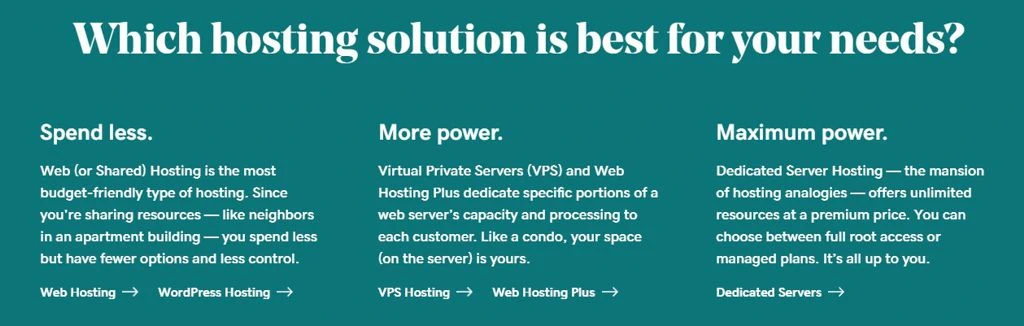
GoDaddy offers several Web Hosting options, from the more affordable Shared Hosting to Dedicated Server Hosting for experienced developers needing ultra-high performance servers and admin access.
Here are some details on the two most popular web hosting options suitable for most looking to host a website.
GoDaddy “Shared” Web Hosting Plans
 These are GoDaddy’s budget-friendly hosting plans and a good start for anyone beginning to build their website presence.
Economy Plan
This affordable entry-level plan is great for many individuals and small businesses building their first website.
- One (1) Website
- 25 GB storage
- 10 databases
- Two (2) free Microsoft 365 mailboxes for the first year
Deluxe Plan
Perfect for multiple sites needing more storage and the ability to host more websites. This plan is a good option for growing businesses.
- 10 websites
- 50 GB storage
- 25 databases
- Three (3) free Microsoft 365 mailboxes for the first year
Ultimate Plan
Suited for complex and heavy traffic sites that need enhanced processing power and security features
- 25 websites
- 75 GB storage
- 50 databases
- Five (5) free Microsoft 365 mailboxes for the first year
Maximum Plan
This hosting plan provides advanced options and increased power for super active traffic sites and online e-commerce websites.
- 50 websites
- 100 GB storage
- 100 databases
- Five (5) free Microsoft 365 mailboxes for the first year
Additional Features Across all GoDaddy “Shared” Web Hosting Plans
All GoDaddy Shared Web Hosting plans include these additional features:
- Unmetered bandwidth
- Automated daily backups
- cPanel hosting control panel
- Website builder
- 1-Click Install of over 150 free apps
- Pre-installed payment platform for WooCommerce
- Free Domain Name (1st Year)
- Free SSL Certificate (1st Year)
GoDaddy Shared Web Hosting is a budget-friendly place to start building your new website. No matter your web hosting needs, GoDaddy has a plan that can help you achieve your online goals.
GoDaddy Web Hosting “Plus” Plans
 These plans are GoDaddy’s step up from Shared Hosting. They provide the power of VPS Hosting with dedicated resources that are simple to manage using “cPanel” Control Panel.
This combination makes it a perfect choice for those needing dedicated server resources that provide consistent performance without the expertise required to manage the underlying server settings.
Launch
The Launch plan is ideal for beginners who are building a new website. It offers a good balance of features and resources at an affordable price.
- 50 websites
- 100 GB storage
- 4GB RAM
- 2 CPUs
Enhance
The Enhance plan is good for small businesses with multiple websites or moderate traffic. It offers more resources and features than the Launch plan.
- 100 websites
- 200 GB storage
- 8GB RAM
- 4 CPUs
Grow
The Grow plan is ideal for medium-sized businesses with high-traffic or multiple resource-intensive websites. It offers even more resources and features than the Enhance plan.
- 150 websites
- 300 GB storage
- 16GB RAM
- 8 CPUs
Expand
The Expand plan is the most powerful GoDaddy Web Hosting Plus plan. It is ideal for large businesses with multiple resource-intensive websites or high traffic. It offers the most resources and features of any of the previous Web Hosting Plus plans.
- 200 websites
- 400 GB storage
- 32GB RAM
- 16 CPUs
Additional Features Across all GoDaddy Web Hosting Plus Plans
All Web Hosting Plus plans include the following additional features:
- Unmetered bandwidth
- Automated daily backups
- cPanel hosting control panel
- Website Builder
- 1-Click Install of over 150 free apps
- Pre-installed payment platform for WooCommerce
- Free Domain Name (1st Year)
- Free SSL certificate
How Do I Switch to GoDaddy Web Hosting?
 Switching to GoDaddy is a relatively straightforward process if you are currently using a different web host. Here are the steps involved.
How to Choose a GoDaddy Web Hosting Plan
Before you choose, consider your website performance under your current hosting plan. What type of hosting plan are you switching from? Are you using Shared, VPS, or Dedicated Hosting?
If your website struggles under its current type of web hosting, consider choosing a plan that offers more performance and resources. If your site is still growing and you’re not using all the resources under your current plan, consider saving money with a less expensive Shared Hosting plan and upgrade as your site grows.
So, before you choose a new web hosting plan, consider your current needs so you don’t overspend on web hosting.
Ask Yourself These Questions:
Website type: What type of website are you migrating to GoDaddy? A personal blog, a small business website, or an e-commerce site? Different website types have different needs, so choose a plan that is right for your website.
Consider Shared Hosting an excellent place to start for a Personal Blog and Small Business website. However, if you plan to sell products and services visitors can purchase directly from your website, consider a hosting plan promoting e-commerce services and WordPress tools such as WooCommerce.
Traffic: How many visitors is your website receiving? If you are actively optimizing your content for SEO and expect an increase in traffic, you should consider a plan with resources you can grow into.
If your site is seeing steady traffic growth, consider one of the top Shared Hosting plans or an entry-level “Plus” plan, a hybrid between VPS and Dedicated Hosting.
Features: What features are important to you? Do you need a plan with a free domain name, one-click WordPress installation, or e-commerce services for an online store?
The plan you choose here will depend on your individual needs. Carefully review all the hosting options to choose a plan that works for you.
Budget: How much are you willing to spend on web hosting? GoDaddy offers a variety of affordable plans, making it easy to find one that fits your needs and budget.
Web Hosting budget is a consideration for many, yet it should not be at the expense of the performance your website needs. If you choose a plan strictly based on cost without considering performance needs, your website will likely not perform to the standards most search engines require. Performance is a ranking factor with Google, where user experience is essential.
Available GoDaddy Web Hosting Plans
While this article covers the more popular “Shared” Web Hosting and Web Hosting “Plus” plans offered by GoDaddy, you will also find a variety of other hosting plans, so you’re sure to find one that is right for you.
Web Hosting (Shared)
Shared hosting is the most affordable type of web hosting. Your website will share the same server resources with many other websites. Most web hosting providers offer this option since it’s a practical choice in web hosting for small businesses building their first website or an individual personal blog.
Web Hosting Plus (Hybrid VPS)
These hosting plans offer the dedicated server resources of VPS hosting yet are managed through the cPanel control dashboard. It provides improved performance over that of shared hosting.
VPS hosting
VPS hosting (Virtual Private Server) is for designers and developers who need complete control of the hosting environment. With total control and root access to the server, your website will have dedicated resources, giving you more control and performance. Fully Managed VPS hosting is available for those seeking VPS performance without the need to manage the virtual server.
Dedicated hosting
Dedicated hosting costs the most because each hosting account has a dedicated server for control and performance. Hosting your website on a dedicated server is ideal for high-traffic websites and online businesses.
Managed WordPress hosting
Managed WordPress hosting plans are specialized web hosting optimized for WordPress sites. GoDaddy handles all the technical aspects of hosting your WordPress site, allowing you to continue creating content for your site.
Managed WooCommerce Store hosting
Managed WooCommerce hosting supports everything you need to get your online shop up and taking orders. These integrated features include payment processing, marketing, shipping, and inventory management, making processing and shipping product orders easy.
Once you Choose a Web Hosting Plan, just sign up for a GoDaddy account and start building your website!
Transferring Your Domain Name to GoDaddy
Transferring your domain is optional and not required to migrate your website to GoDaddy. However, as you will read later in his article, some advantages exist, such as having all your website assets under one account for easy management.
Therefore, should you transfer your domain name to GoDaddy, contact your current domain registrar and initiate the transfer process. This process can vary depending on your registrar but is typically straightforward.
Once you initiate the transfer, you must approve the transfer from GoDaddy. Once approved, your domain name will transfer to GoDaddy, and you can manage it from your GoDaddy account.
How to Transferring Your Website to GoDaddy
How you do this depends on the platform you used to build your website. WordPress is a very popular website platform with several migration plugins supported to help make this transition.
Optionally, GoDaddy recommends several migration tools/plugins for a successful migration.
If you built your website using another method, you’ll want to confirm if you can migrate away from your current web host provider. Unfortunately, many build their websites without considering that they may want to switch hosting providers one day. These proprietary site builders are good for the provider but bad for the customer who wants to change web hosting services later.
However, if your website is coded in Old school” HTML or a current variant, you can transfer them using an FTP client or the GoDaddy File Transfer Manager.
You will connect to GoDaddy’s FTP servers using an FTP client and then upload your website files to the appropriate folder.
Using the GoDaddy File Transfer Manager, you will select your website files from your computer and then upload them to the appropriate folder on GoDaddy’s servers.
Again, if you built your website using your current web host’s proprietary site-building tools and cannot move it to a new host. Consider redesigning your website in WordPress and then redirect your domain’s DNS to your new site once completed (we’ll talk about this next). Doing this will make it easy to move your website in the future.
How to Update Your Website’s DNS Settings
Once you have transferred/migrated your website files and your domain name to GoDaddy, you will need to update your domain DNS settings so it points to your new website. This update will tell the internet where to find your website.
If you transferred your domain to GoDaddy, you will update your website’s DNS settings by logging into your GoDaddy account and then navigating to the DNS Management page. You can then edit your DNS settings to point to GoDaddy’s servers.
Once you have updated your website’s DNS settings, it may take up to 48 hours for the changes to propagate (although, in my experience, this typically takes just a few hours). Afterward, your website will be hosted on GoDaddy’s servers and accessible to visitors.
Here is how you update your DNS Settings with GoDaddy.
Getting the Most Out of GoDaddy Web Hosting
Once you have switched to GoDaddy hosting, there are a few things you can do to get the most out of your new web host service:
- Use the GoDaddy website builder: GoDaddy’s website builder is a great way to create a website without having coding knowledge. It offers many templates and tools to help you get started. Just remember what we said about proprietary site builders.
- Install WordPress: WordPress Content Management System (CMS) is the defacto website-building platform that is easy to use and customize. GoDaddy makes it easy to install WordPress with just a few clicks. (WordPress is today’s standard for building a new website!)
- Use GoDaddy’s security features: GoDaddy offers a variety of security features to protect your website, such as SSL certificates and malware scanning.
- Use GoDaddy’s customer support: GoDaddy offers 24/7 customer service via phone support, live chat support, and email. If you have any questions or problems, contact GoDaddy’s customer support team for assistance.
- Sign up for GoDaddy Pro: GoDaddy Pro is a centralized dashboard for managing your website(s). It offers many free website management services, such as scheduled backups, malware scans, and uptime monitoring with email notifications should your website ever go offline. These are just a few of the valuable tools available.
So, should you Consider Hosting with GoDaddy?
GoDaddy is a good web hosting provider for all website hosting needs. It offers a variety of affordable plans with a wide range of features, all hosted by data centers located in North America, Europe, and Asia. However, there are a few things to be aware of. GoDaddy regularly rebrands its hosting plans’ names, often making it difficult to find accurate third-party comparisons and recommendations. Plus, while offering free domain names and email accounts for the first year is a small savings, the renewal is at full price and often more expensive than other domain registrars.
Additionally, the free SSL is the same situation. While this is also a saving initially, the renewal costs add up. You might consider using a free SSL certificate service such as Let’s Encrypt, although some technical knowledge for setup is required.
Alternatively, consider creating a free account at CloudFlare and using their free SSL services, plus the many other performance-enhancing tools they offer. Cloudflare is a Content Delivery Network (CDN) that provides useful tools to improve security and website performance. Most of their features work by simply enabling the option, while others require some level of technical understanding. These services provide excellent explanations of these settings and how to use them.
It’s also important to know that GoDaddy aggressively upsells features you may not need. At the same time, I’ve personally always received quick and excellent customer support. Some users have reported that there can be delays depending on when you call. Although, the support has typically been very knowledgeable regarding any issue I had.
Final Thoughts
GoDaddy is a fast and reliable option if you’re planning to build a website or switch to a different web hosting provider. They offer wise variety of options for all types of website hosing needs from Dedicated Servers to Website Builder Plans offered mainly for beginners or those that need to get a site up and running quickly.
However, it’s important to compare plans and read reviews before deciding. If you find GoDaddy’s hosting plans are not the best fit for your website, consider one of these other Top-Rated Web Hosting Services.